Discord's intents review for a custom bot
Discord asks every application used by 10,000 people or more to apply for the privileged intents it uses, and to apply again every year. A custom bot in a large server reaches that number on its own. If the review is not sent, or not approved, Discord takes the intents away and FlaviBot can no longer start the bot: the Custom Bot page then says Missing privileged intents.
Your custom bot runs FlaviBot, so the answers are FlaviBot's. This page holds all of them, in the order of Discord's form. Each grey box has a Copy button.
Before you open the form
1. Turn Presence off. On the Developer Portal, open your application, then the Bot page, and switch Presence Intent off under Privileged Gateway Intents. FlaviBot never uses it, so nothing changes for your bot. Leave Server Members Intent and Message Content Intent on: FlaviBot needs both.
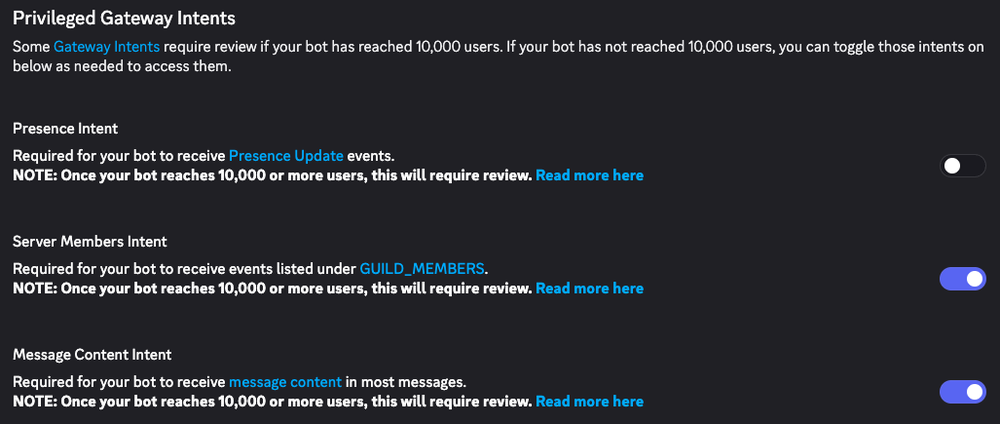
Presence off, the two others on.
2. Fill in the brackets. The first answer names your bot and your server:
replace [your bot's name] and [your server's name] before you send it.
3. Keep one link at hand. Discord asks for screenshots of each intent at work. The use cases page has them, feature by feature, so the same link answers both screenshot fields:
https://flavibot.xyz/docs/privileged-intents/01-use-cases
Application details
What does your application do?
[your bot's name] is the custom bot of the [your server's name] Discord server, powered by FlaviBot (https://flavibot.xyz). It runs FlaviBot's features under the server's own name and avatar, and it is configured from FlaviBot's web dashboard (https://flavibot.xyz/dashboard).

FlaviBot is a multipurpose Discord bot that brings music, member onboarding, moderation, automations, community features and support tools together in one bot. Each module is turned on and configured per server from the dashboard:
- Music: a music player that supports Spotify, Apple Music, Deezer, Tidal and Amazon Music, plus direct links, radio and uploaded audio files, with a web player and a music controller channel.
- Members: welcome and goodbye messages with image cards, auto-roles, persistent roles (given back when a member rejoins), invite tracking, and rewards for members who boost the server or wear its server tag.
- Moderation: moderation commands with a case history, Discord AutoMod integration and server logs.
- Automations: a rule builder that reacts to messages, reactions, member joins and other events, for example to delete scam links or to kick accounts that are too new.
- Community: levels, economy, giveaways, starboard, counting channels, sticky messages, temporary voice channels and counter channels.
- Support and organisation: tickets with transcripts, forms, suggestions, events, tasks, an embed builder and optional AI characters.

Documentation: https://flavibot.xyz/docs
What it uses each privileged intent for, with screenshots: https://flavibot.xyz/docs/privileged-intents/01-use-cases
Do you have a public Privacy Policy telling your users about their data usage?
Yes.
Where is your Privacy Policy available?
FlaviBot's privacy policy applies to this bot. It is linked in the footer of every page of FlaviBot's website, https://flavibot.xyz, and from FlaviBot's page in Discord's App Directory. In Discord, the /privacy command tells each member privately which statistics are collected about them, lets them turn that collection off, and explains how to request the deletion of their data.
If you also put the link in your bot's description (Developer Portal, General Information, Description, which Discord shows on the bot's profile), say so at the start of that answer.
Please share a link to your Privacy Policy.
https://flavibot.xyz/legal/privacy-policy
Privileged Gateway Intents
The form lists the intents you are applying for. Tick Server Members Intent and Message Content Intent, and leave Presence Intent unticked: FlaviBot never uses it. The form only asks about the intents that are ticked.
Server Members Intent
Why do you need the Guild Members intent?
This bot runs FlaviBot, which uses the Server Members intent for features that server managers turn on from its dashboard.

1. Member join, update and leave events
- Welcome: welcome messages and image cards, auto-roles, and an optional welcome DM.
- Goodbye messages when a member leaves.
- Persistent roles: the roles a member had when they left are given back if they rejoin, for a period the server chooses (365 days at most).
- Invite tracking: credits the member who invited a newcomer, with fake-invite and rejoin detection.
- Boost and server tag rewards: roles and messages for members who boost the server or wear its server tag.
- Server logs: joins, leaves, and nickname, role, avatar and timeout changes.
- Automations: rules triggered when a member joins or leaves, gains or loses a role, boosts, or is timed out. Servers use them against raids and scams, for example to kick or ban accounts younger than a set age.
- Clean-up when a member leaves: a notice is posted in the tickets they opened, the tickets they had claimed are released, they are removed from the server's teams, and their access to that server's dashboard and ticket chat ends.
- Server statistics: daily joins and leaves, and the member count shown on the dashboard and in counter channels.

2. The full member list, only for actions a server manager starts or turns on
- /mass-role add: gives a role to every human member of the server who does not have it yet.
- Economy role income: pays coins to every member who holds a configured role.
- /info boost, /info server-tag and /badge-count, and the dashboard buttons that give the boost and server tag rewards to members who already qualified before the feature was turned on.

3. Up-to-date roles
Member update events keep the bot's copy of each member's roles current. The dashboard and the moderation commands check those roles to decide who may change a server's settings or moderate its members. Without these updates, a member who lost a staff role could keep powers they no longer have.
Please provide links to screenshots and/or videos that demonstrate your use case
https://flavibot.xyz/docs/privileged-intents/01-use-cases#server-members
Are you storing any API Data off-platform (outside of Discord)?
Yes. FlaviBot keeps member identities, saved roles, invites, joins and leaves, levels, economy balances and moderation cases in its database. Three more questions then appear.
Are you storing API Data for 30 days or less?
No. Saved roles are kept for up to 365 days, and invites, levels and moderation cases for as long as the bot is used on the server.
How do users contact you to request deletion of their activity data?
In Discord, any member can run /privacy: its "Delete my data" button explains how to request the deletion of their data. Requests are made on FlaviBot's support server (https://discord.gg/flavibot) or by email at contact@flavibot.xyz. FlaviBot checks that the person controls the Discord account, then deletes their data from its databases and caches after a grace period of about 30 days, during which they can cancel. Server owners can request the deletion of all of their server's data the same way. Details: https://flavibot.xyz/legal/privacy-policy
Are you encrypting the data that you store at rest, as is required by our developer policy?
FlaviBot stores this data on its own servers, so this answer is FlaviBot's to give. Ask on the support server before you choose.
Message Content Intent
Can users opt-out of having their message content data tracked?
No. /privacy turns off a member's statistics (message counts, XP), not
the reading of messages by the server's logs, automations and tickets, which
the server's managers set up.
Are you storing message content data off-platform (outside of Discord)?
Yes, for features a server turns on: ticket staff notes and the AI ticket assistant's summaries stay with the ticket, AI characters remember short facts about the members who talk to them, and short-lived caches hold recent messages for message logs (48 hours) and AI characters (2 hours). Three more questions then appear.
Are you storing user message content data for 30 days or less?
No. The caches expire on their own, but staff notes and the assistant's summaries stay with the ticket, and a character's facts stay until the member erases them.
How do users contact you to request deletion of their activity data?
The same answer as for Server Members:
In Discord, any member can run /privacy: its "Delete my data" button explains how to request the deletion of their data. Requests are made on FlaviBot's support server (https://discord.gg/flavibot) or by email at contact@flavibot.xyz. FlaviBot checks that the person controls the Discord account, then deletes their data from its databases and caches after a grace period of about 30 days, during which they can cancel. Server owners can request the deletion of all of their server's data the same way. Details: https://flavibot.xyz/legal/privacy-policy
Are you encrypting the data that you store at rest, as is required by our developer policy?
The same as for Server Members: ask on the support server before you choose.
Will the message content data be used to train machine learning or AI Models?
No. The form only asks for an explanation with Yes. The next answer says which optional features send message content to an AI model, and that it is used to reply, never to train.
Why do you need the Message Content intent?
This bot runs FlaviBot, which reads message content only for features a server manager turns on, and only in channels the bot can see.

- Automations: rules that match the text of new and edited messages (contains, starts with, exact match, or a regular expression run with RE2) and act on it. Servers use them to delete scam and phishing links, filter banned words and answer frequently asked questions.
- Server logs: when a message is edited or deleted, the log channel shows what it said before and after. Discord does not resend the old text with these events, so for servers with message logs or edit/delete rules enabled, recent messages go into a temporary cache that expires automatically after 48 hours.
- Discord AutoMod logs: show the message AutoMod blocked and the part that matched.
- Counting channels: each message is checked to be the next number.
- Music controller channel: members type a song name or link to add it to the queue.
- Starboard: popular messages are reposted with their text and images.
- Tickets: the ticket's live view on the dashboard, the transcript generated when a ticket closes, staff notes written in the ticket, and, when enabled, the AI ticket assistant.
- AI characters: a character set up by the server replies when it is mentioned, replied to or called by its trigger word, or joins the conversation on its own if the server chooses, using the channel's recent messages as context (held for 2 hours). It can remember up to 20 short facts about each member who talks to it; a member erases them with /persona forget, and /persona optout stops every character from answering them.

None of this content is used to train machine-learning or AI models. The AI ticket assistant and AI characters, which a server manager must turn on, send it to Anthropic's API for inference only, and Anthropic does not train on it. Apart from the 2-hour context and the facts a character remembers, only the generated reply or summary is kept.

FlaviBot also answers prefix commands. They are being retired: every prefix command already tells members to use the slash command instead, and commands that mention the bot keep working without this intent.
Please provide links to screenshots and/or videos that demonstrate your use case
https://flavibot.xyz/docs/privileged-intents/01-use-cases#message-content
If the form asks about Presence
Its questions only appear when Presence Intent is ticked under Privileged Gateway Intents. Untick it. If it cannot be unticked, answer the truth: the bot does not use it.
Why do you need the Guild Presences intent?
This bot does not use presence data. FlaviBot, which it runs, does not request the Guild Presences intent when it connects to Discord, and no feature reads presence or activity data. Online-member figures come from approximate_presence_count. We are not applying for this intent and it can be removed from the application.
Can users opt-out of having their Presence data tracked? No. Nothing is tracked, so there is nothing to opt out of.
Are you storing user activity data off-platform (outside of Discord)?No.
Before you press Submit
Submitting certifies that the answers are accurate. They describe FlaviBot as it works today, for every bot it runs. If something in them does not match how you use your bot, ask on the support server before you send the form.
