Privileged intents use cases
Discord keeps three kinds of data behind privileged intents: the text of messages (Message Content), the member list and its changes (Server Members), and who is online and what they are doing (Presence). This page lists every FlaviBot feature that needs one of them, with a screenshot of each feature working in a Discord server.
It is written for Discord's review team, and for owners of a custom bot, who link this page when they answer Discord's intents review. Every FlaviBot bot runs the same code, custom bots included, so everything below applies to all of them.
Two rules hold for every feature on this page. It does nothing until a server manager turns it on from the dashboard, and the bot only sees the channels the server lets it view.
| Intent | Used | For |
|---|---|---|
| Message Content | yes | automations, server logs, counting channels, the music controller, starboard, tickets, AI characters |
| Server Members | yes | welcome and goodbye messages, persistent roles, invite tracking, boost and server tag rewards, member logs, join automations, server-wide role actions, permission checks |
| Presence | no | nothing: FlaviBot never requests it |
Message Content
FlaviBot reads the text of a message only for the features below, and only in the channels where a server turned them on.
Automations
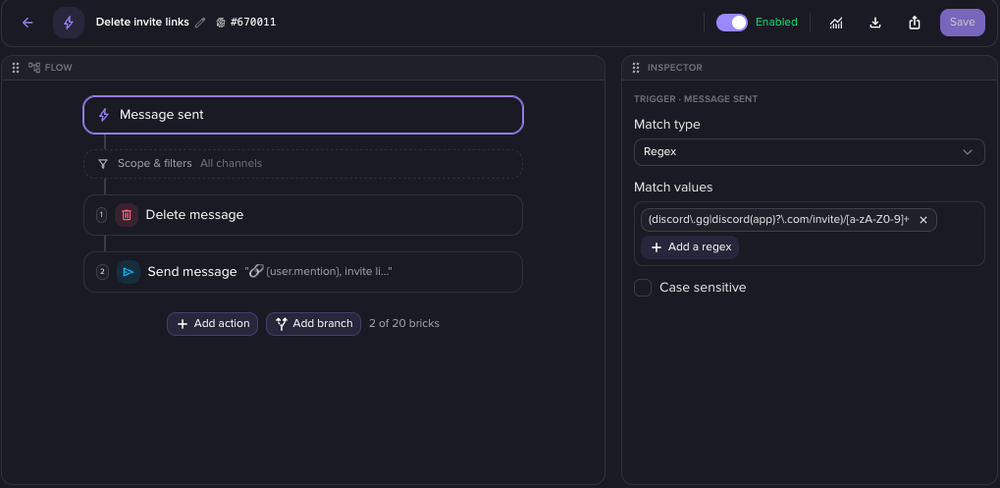
The autoresponder matches the text of new and edited messages against rules the server writes: contains, starts with, exact match, or a regular expression (run with RE2, so no pattern can stall the bot). Servers use it to delete scam and invite links, filter banned words and answer common questions.

Server logs
When a message is edited or deleted, the server logs show what it said before and after. Discord does not resend the old text with these events, so for servers with message logs, or with automations on edited and deleted messages, recent messages go into a temporary cache that expires on its own after 48 hours.
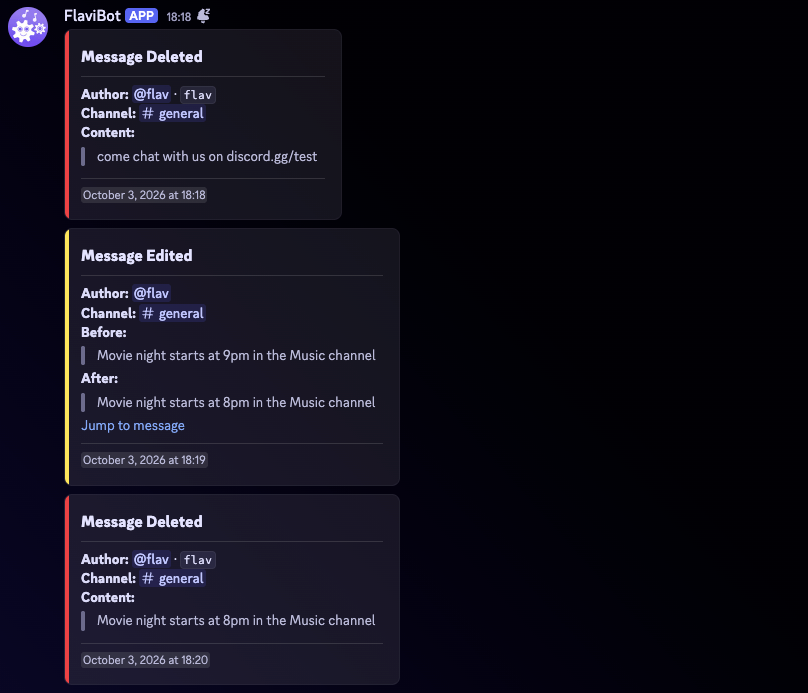
A moderator can see what a message said after its author edited or deleted it.
Counting channels
In a counting channel, members count up together. FlaviBot reads each message
to check it is the next number (simple maths like 4+5 too, when the server
allows it), and adds ✅ to each right one. A wrong number ends the run:
FlaviBot says what went wrong, and the count starts again at 1 unless a save
keeps it alive.
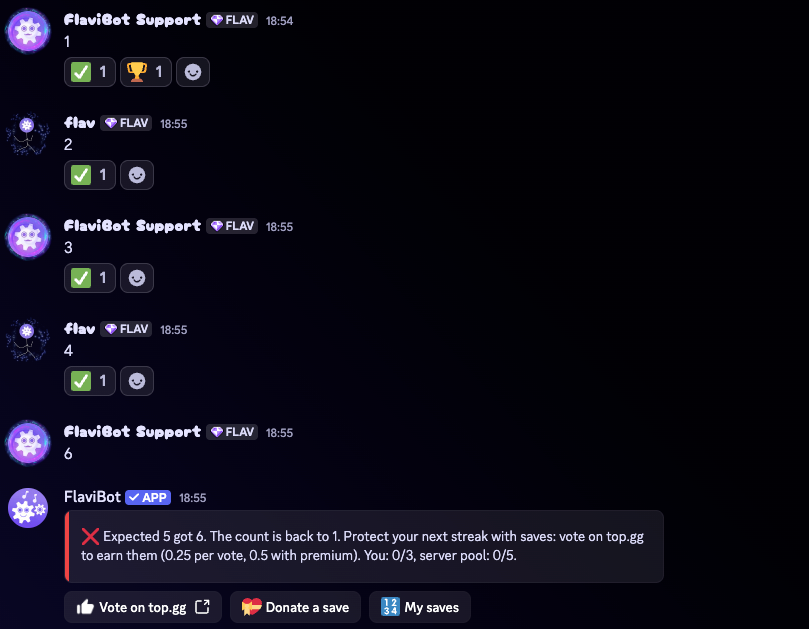
Each right number gets a check. A wrong one ends the run.
Music controller channel
In the controller channel, members type a song name or a link, with no command, and it starts playing or joins the queue. One panel message in the channel shows what is playing.
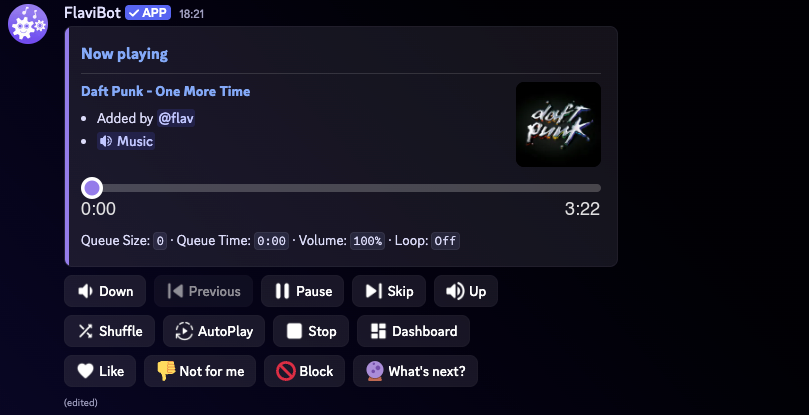
The panel right after a member typed a song name, with no command.
Starboard
The starboard reposts a message that enough members reacted to, with its text and its first image, in a channel the server picks.
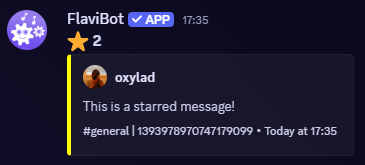
The reposted message, with a link back to the original.
Tickets
Tickets need the text of what members and staff write in them:
- the ticket's page on the dashboard shows the conversation live, so staff can answer from the website;
- what staff write in the private
📋 Staff notesthread is kept as a note on the ticket, still readable after the channel is deleted; - the transcript is built from the ticket's messages when it closes;
- when a server turns on the AI assistant, it reads the ticket to draft an answer from the server's own knowledge base, and summarises the ticket when it closes.
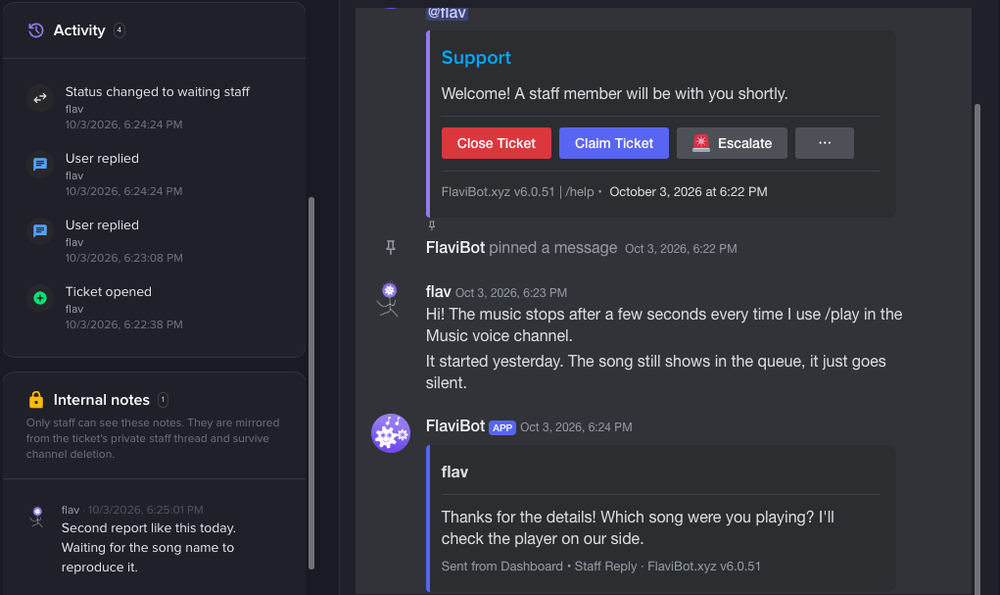
A ticket on the dashboard: the conversation and the staff notes.
AI characters
A server can create an AI character that answers when a message contains its trigger word. It reads the channel's recent messages so its reply fits the conversation. Those messages are kept in a temporary cache for 2 hours.
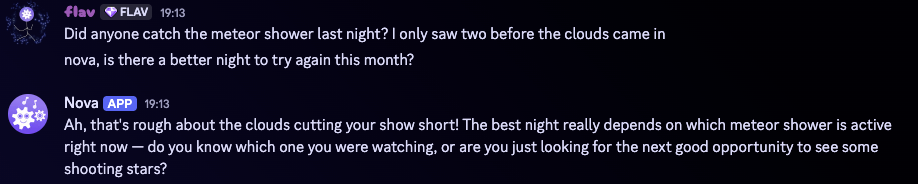
The character answers the conversation, not only the last message.
Prefix commands
FlaviBot also answers commands typed with a prefix, such as !play. They are
being retired: every prefix command already tells the member which slash
command to use instead, and a command that mentions the bot keeps working
without this intent.
Server Members
FlaviBot uses this intent in three ways: to react when a member joins, leaves or changes, to read a server's full member list for a few actions a server manager starts, and to keep members' roles up to date.
Welcome and goodbye messages
When a member joins, FlaviBot can post a welcome message with an image card, give them roles, and send them a welcome DM. When they leave, it can post a goodbye message.
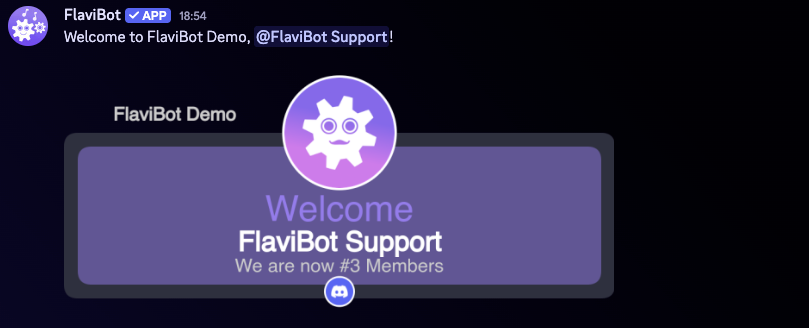
The welcome message a new member sees in the server.
Persistent roles
When a member leaves, FlaviBot remembers the roles they had and gives them back if they rejoin within the period the server chooses (365 days at most). The server picks which ones: every role, a list, or the roles below a role it chooses.
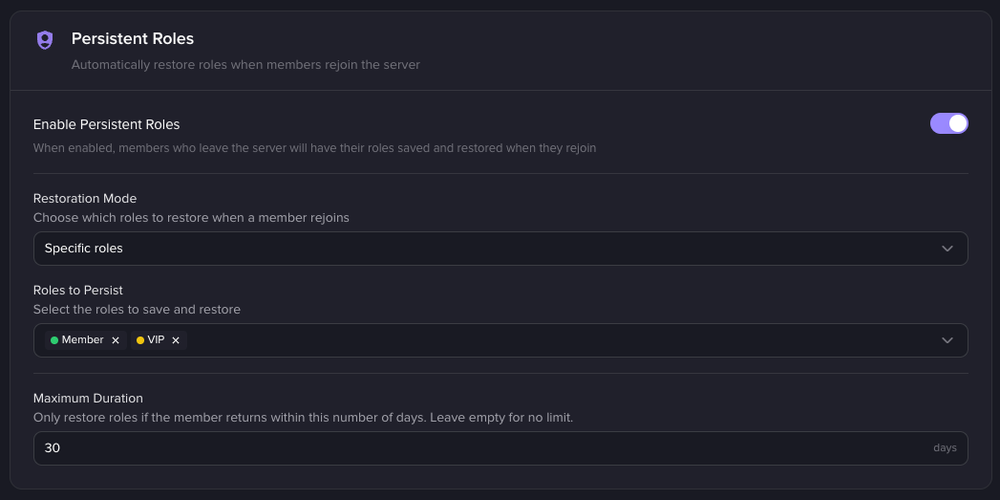
The server decides which roles come back, and for how long.
Invite tracking
FlaviBot matches each join to the invite that was used and credits the member who shared it. Self-invites, leave-and-rejoin loops and accounts that are too new count as fake. Servers use it to reward the members who bring people in.

/invites leaderboard: who brought people in, and how many stayed.
Boost and server tag rewards
Members who boost the server get a reward role, and the server can thank them with a message and a DM. Members who wear the server's tag on their profile get a role too. FlaviBot notices both through the member update event, and takes the role back when they stop.
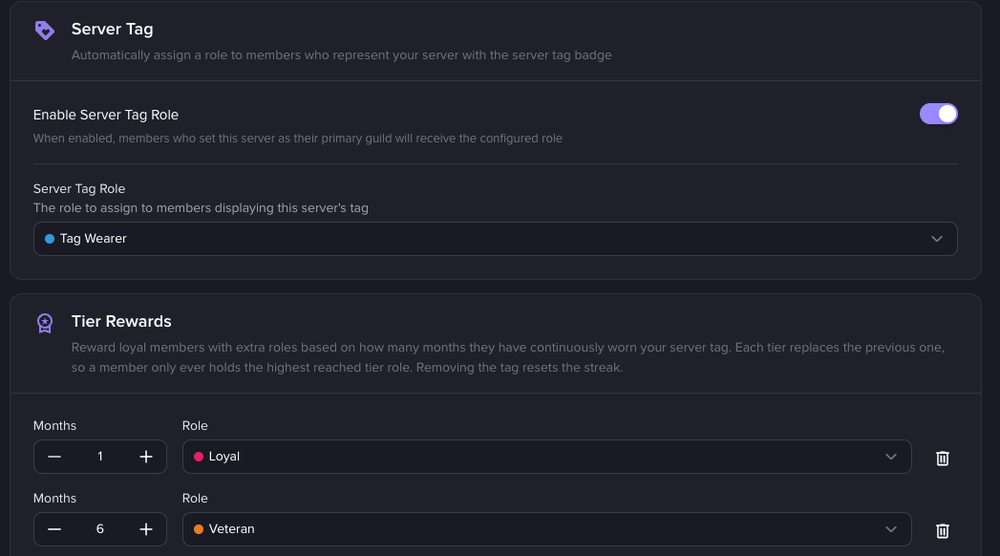
The roles a member gets for wearing the server tag.
Member logs
The server logs record members joining and leaving, and their nickname, role, avatar and timeout changes. A join line carries the account's age and the invite used, which is how moderators spot a raid.
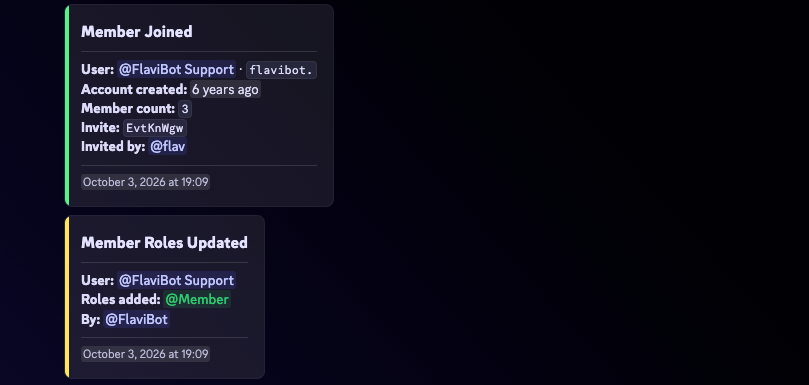
A join and a role change, as the moderators see them.
Automations on joins and member changes
Automations can start when a member joins or leaves, gains or loses a role, boosts, or is timed out. Servers use them against raids and scams, for example to kick accounts younger than an age the server sets.
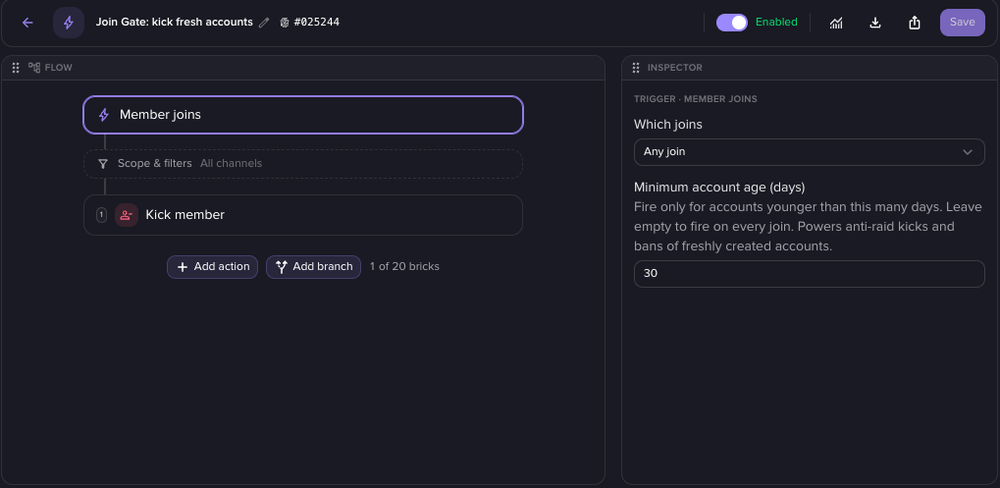
The curated Join Gate preset: new accounts are kicked before they can post.
Server-wide role actions
A few actions need the whole member list. Each one is started, or turned on, by a server manager:
/mass-role addgives a role to every human member who does not have it yet;- economy role income pays coins to every member holding a role the server chose;
/info boost,/info server-tagand/badge-countcount the members concerned, and the dashboard buttons that give the boost and server tag roles to members who already qualified before the feature was turned on.
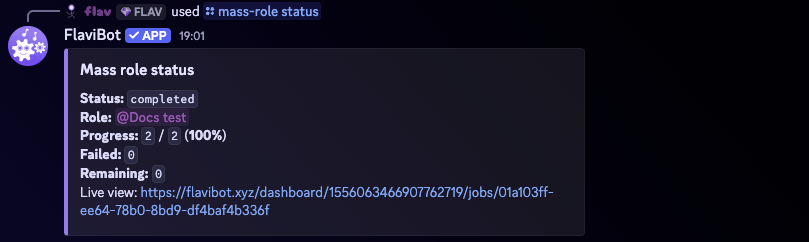
/mass-role status once the role has reached every member.
Permission checks
Member update events keep FlaviBot's copy of each member's roles current. The dashboard and the moderation commands check those roles to decide who may change a server's settings or sanction a member, so a moderator who loses their staff role loses those powers at once.
Presence
FlaviBot does not use the Presence intent. It never requests it from Discord, so it never receives who is online or what anyone is playing or listening to. The online count it shows comes from the approximate count Discord gives every bot.
What happens to this data
- Nothing here trains an AI model. FlaviBot does not train or fine-tune any model with message content or member data, and does not let anyone else do so. The two AI features above, which a server must turn on, send text to Anthropic's API to write a reply or a summary, and Anthropic does not train on it.
- Message text is not kept, with these exceptions: the temporary caches (48 hours for logs, 2 hours for AI characters, and about an hour for a 200-character excerpt when a server debugs an automation), ticket staff notes, and what the ticket assistant writes (a summary, and knowledge base entries stripped of names and personal details).
- Members stay in control.
/privacyshows each member the statistics FlaviBot keeps about them, turns them off, and explains how to have their data deleted.
The full list, with how long each thing is kept, is in the privacy policy.
