Temporary Voice Channels
Temporary voice channels replace a row of static voice channels with one creator channel. A member joins it, FlaviBot builds a room named after them in the category you picked, moves them in and posts a control panel in the room's text chat. The owner renames the room, caps it, locks or hides it and decides who may come in, and when the last person leaves, FlaviBot deletes it. There are no commands: everything happens from the panel. FlaviBot needs Manage Channels and Move Members, and the feature is free.
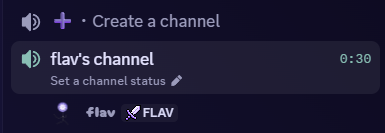
One channel hands out rooms
A member joins the creator channel, FlaviBot builds a room named after them in the category you picked, moves them in, and deletes it once the last person leaves.
A control panel in every room
The owner renames the room, caps it between 0 and 99 members, locks it, hides it, and allows or blocks individual members, as buttons or as a dropdown.
Ownership that moves
A room lives as long as someone is in it, not as long as its owner is. When the owner leaves and friends stay, anyone still inside can claim it.
Nothing to type
There are no commands for this module. Members drive it entirely from the panel inside their own room, and nobody has to ask a moderator for a channel.
Full documentation
Every setting explained, step by step.
Questions about Temporary Voice Channels
What permissions does FlaviBot need for temporary voice channels?
Manage Channels, to create and delete rooms, and Move Members, to move the member into their room. If the move fails, FlaviBot deletes the room rather than leave an empty channel behind.
What happens when the owner leaves the room?
The room stays as long as someone is in it, and anyone still inside can claim it. By default, a bot left on its own does not keep the room alive.
Can a member own more than one room?
No. It is one room per member per server: joining the creator channel again moves them back into the room they already own.
Related features
- Music PlayerFlaviBot's music player supports Spotify, Apple Music, Deezer, Tidal, Amazon Music and radio stations, with a shared queue, saved playlists and audio filters.
- AutoresponderFlaviBot's autoresponder builds automations: pick one of more than 35 triggers, add filters, then chain actions such as messages, roles and warns.
Ready to try it out?
Add FlaviBot to your server and start using this feature for free.
Add to Discord