Starboard
A starboard is a hall of fame your members curate. Anyone reacts to a message with a chosen emoji; once enough people have done it, FlaviBot reposts that message in a channel of your choice with a link back to the original.
It is the community version of pinned messages: nobody needs Manage Messages, and nothing gets highlighted unless several people agree.
Setting one up
Go to Engagement > Starboard in the dashboard. Press Add, give the panel a name (the name is only for you, it never appears in Discord), then open it with Edit.
Inside, you need three things:
- The Starboard Channel, where highlighted messages get posted.
- The Reaction emoji members react with. A standard emoji or one of your
server's custom emojis. Leave it unset and it is the star,
⭐. - The Reaction threshold, the number of reactions a message needs. The minimum is 2, so a message can never be highlighted by one person alone.
Then flip the panel's switch on.
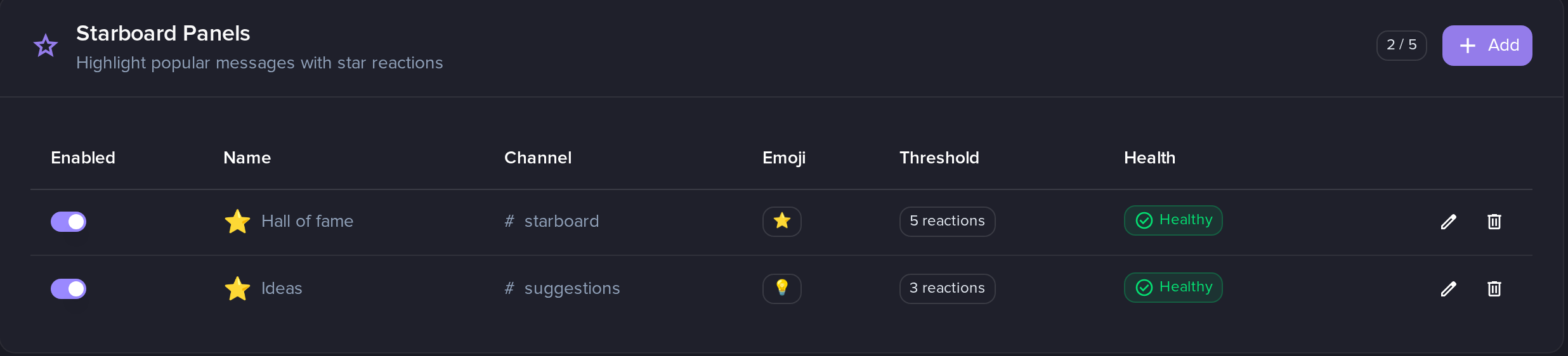
Two panels, each with its own emoji and its own threshold. The counter next to Add is how much of your allowance you have used.
How many panels you get
One panel is one emoji with one threshold posting to one channel. A second
panel lets you run, for example, a ⭐ board at 5 stars for general highlights
and a 💡 board at 3 for ideas.
| Free | Silver | Gold | Platinum |
|---|---|---|---|
| 1 | 3 | 5 | 20 |
What actually gets posted
The starboard message shows the reaction count, then an embed with the original author's name and avatar, the message text, its first image attachment if it has one, and a footer with the source channel name and the original message id.
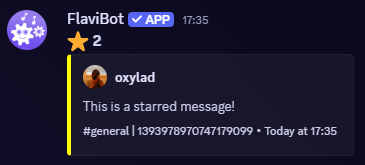
The count on the first line is live. The channel name and the long number in the footer are where the message came from, so anyone can find the original.
That post stays in sync with reality:
- More reactions come in, the count on the post is updated.
- Reactions are taken back and the total falls below the threshold, the post is deleted.
- The original message is deleted, the post is deleted.
- A moderator clears the reactions off the original, the post is deleted.
If you delete the starboard post by hand, it comes back the next time someone adds a reaction to the source message. Removing reactions instead is the way to make something leave the board for good.
Filters
Four settings decide which reactions count. They are all in the panel's configuration.
Allow self-stars is off by default: the author of a message cannot star their own message. When someone tries, the reaction is removed from the message so it does not sit there looking like it counted.
Allow bot messages is off by default: messages posted by bots are not eligible.
Channel restriction limits which channels messages can be starred from. Set it to whitelist to allow only the channels you list, or blacklist to allow everywhere except those. Up to 50 channels.
Role restriction limits who is allowed to star. Whitelist means the member needs at least one of the listed roles; blacklist means having any of them disqualifies them. Up to 25 roles. A reaction from someone who is not allowed to star is removed from the message.
Posting into a forum
Point the panel at a forum or media channel and each starred message opens its own thread instead of adding a message to a channel.
You can name those threads with Forum thread name, using these placeholders:
| Placeholder | Becomes |
|---|---|
{user.username} | The original author's name |
{user.id} | The original author's id |
{message.id} | The original message's id |
{message.preview} | The first 60 characters of the message |
Leave it blank and threads are named <username> starred a message. Thread
names are cut to 100 characters, which is Discord's limit. You can also apply
up to 5 of the forum's tags to every thread.
Forum threads track the count internally but the visible post is not rewritten as reactions come and go, unlike a normal channel post.
Permissions
In the starboard channel the bot needs View Channel, Embed Links and Send Messages. For a forum target it needs Embed Links and Create Public Threads instead. It also needs to be able to read the channels members star from, and Manage Messages there if you want it to clean up reactions it rejected.
When a panel switches itself off
Each panel has its own health. After 10 consecutive permanent failures, for example the starboard channel was deleted or the bot lost Embed Links there, that panel is disabled and the panel list shows why and when. Fix the cause, then switch the panel back on.
