Spotify
Spotify is FlaviBot's default source. You do not need to link anything to play from it.
Playing a Spotify link
Paste it into /play:
/play query: https://open.spotify.com/track/4uLU6hMCjMI75M1A2tKUQC
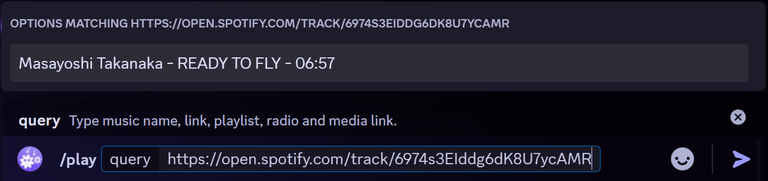
Track, album and playlist links all work. An album or playlist link queues everything in it, up to 500 tracks on a free server and 10,000 on a Premium one.
To get a link in the Spotify app, open the three dot menu on a track, album or playlist and choose Share, then Copy link.
You do not have to use links at all: a plain search like
/play query: fleetwood mac dreams already searches Spotify.
Linking your account
Linking lets FlaviBot list your own public Spotify playlists so you can play them with a button instead of hunting for links.
/spotify set-id id: yourusername
The command accepts your Spotify username, a link to your profile
(https://open.spotify.com/user/...), or a spotify:user:... URI, so whichever
one you happen to have copied will work.
Where to find your username:
- Mobile app: Home, your picture at the top left, Settings and privacy, Account, Username.
- Web player: your picture at the top right, Account, Edit profile, the Username field.
The three steps in the Spotify web player, in order:
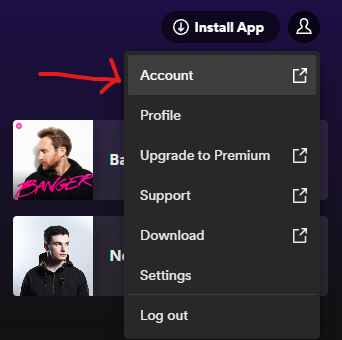
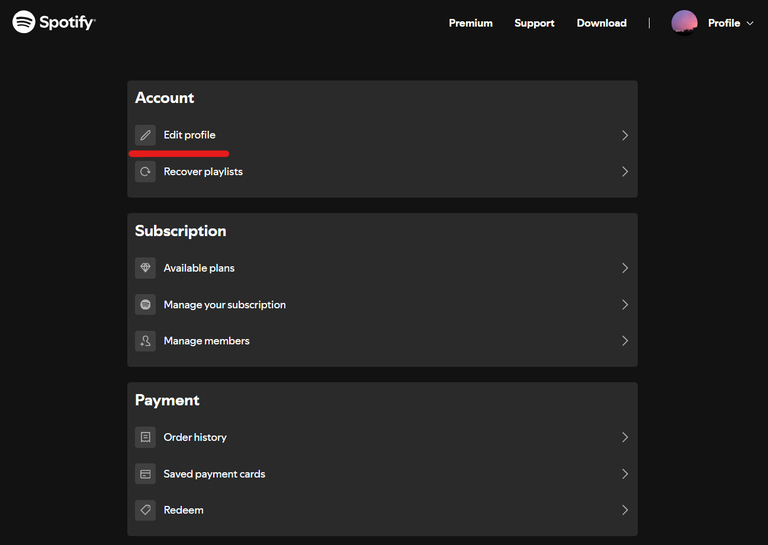
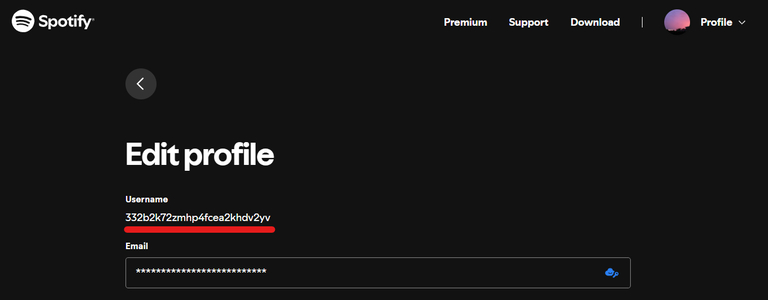
FlaviBot confirms with the display name of the account it found. If that is not you, you copied the wrong id, so run the command again with the right one.
/spotify remove-id unlinks the account.
Note that this is a one way lookup of a public profile. FlaviBot does not sign into your Spotify account, cannot see your private playlists, and cannot change anything there.
Playing your playlists
/playlist spotify
This lists your public Spotify playlists, five per page, each with a Play button that queues it. Arrows move between pages.
Three things can go wrong, and the reply says which:
| Message | Cause |
|---|---|
| No Spotify account linked | run /spotify set-id first |
| User not found | the id is wrong, or Spotify is having trouble |
| No public playlist | your playlists exist but are all private |
That last one is the common one. Spotify playlists are private by default. In the Spotify app, open the playlist, use the three dot menu, and make it public. FlaviBot can only see what Spotify shows to the public.
The web player shows the same list in its Playlists tab.
Copying a Spotify playlist into a FlaviBot playlist
If you would rather own the tracks in a FlaviBot
playlist, hand the Spotify link to
add-song:
/playlist add-song playlist_name: chill query: https://open.spotify.com/playlist/...
Every track from the Spotify playlist is added to yours in one go, and from then on it is yours to reorder and share.
